
Your script, as written
Builder and algebra mode, selectors, Locations, joints — build123d 0.13 code runs as you wrote it, and numpy, bd_warehouse and sympy import as usual.
Paste a build123d script, or open a link that carries one, and it builds right in your browser. The size constants in your code become sliders that rebuild as you drag; when it's right, export STEP or STL. No Python or OCP to install, no sign-up, and your code is not uploaded.
Builder and algebra mode, selectors, Locations, joints — build123d 0.13 code runs as you wrote it, and numpy, bd_warehouse and sympy import as usual.
It builds real solids, not meshes: true planes, cylinders and holes. One click exports STEP (opens in Fusion, SolidWorks, Onshape and FreeCAD) or STL (for your slicer).
Knobs declared with #@ — or, without any, every number constant at module level — appear as sliders. Dragging one rewrites that number in your code and rebuilds.
“Make the holes M4”, “loosen the lid”: the AI edits the code, your browser rebuilds it, and an edit that doesn't build is not applied. Two a day without an account; save the part to My models and the AI agent can carry on with it.
A failure names the line in your code and marks it in the editor, with one click to have the AI fix it. Code that runs in build123d but fails or builds a different shape here goes to us with “Report a problem”.
“Copy link” puts the current code into the URL, so whoever opens it sees the same part. When ChatGPT or Claude writes build123d for you, ask it for such a link.
Each opens already built in your browser. Drag the sliders to resize it, then export STEP. No sign-up.
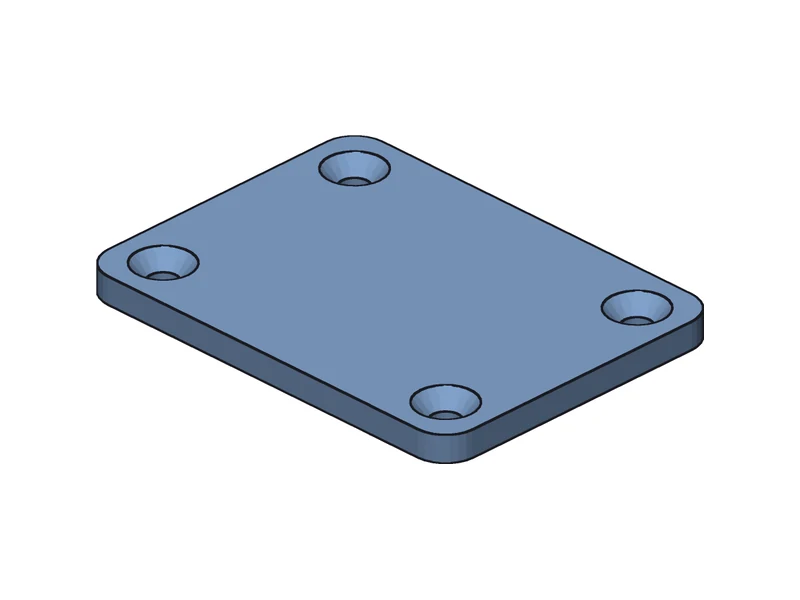
A rounded plate with four countersunk holes: GridLocations places them, fillet picks only the vertical edges.
Open and export STEP →
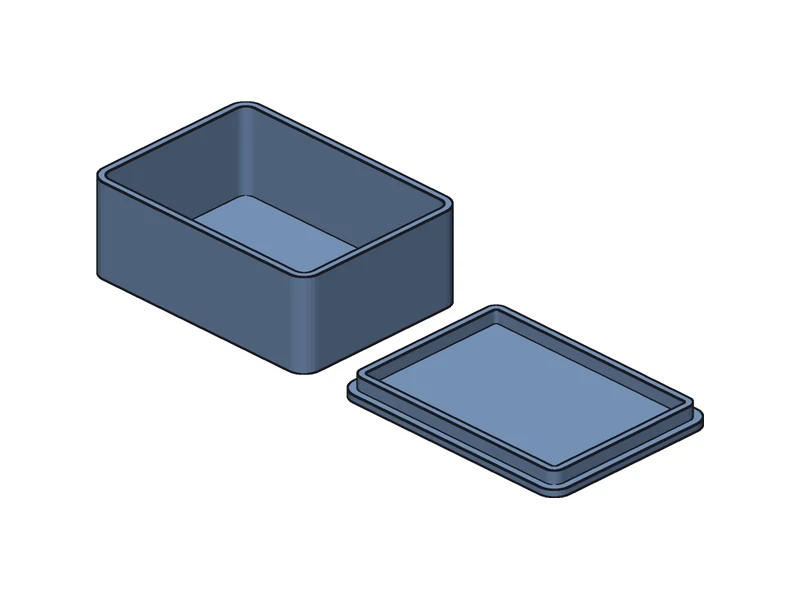
offset shells an open box; the lid has a lip that slips inside, with the clearance as a parameter.
Open and export STEP →
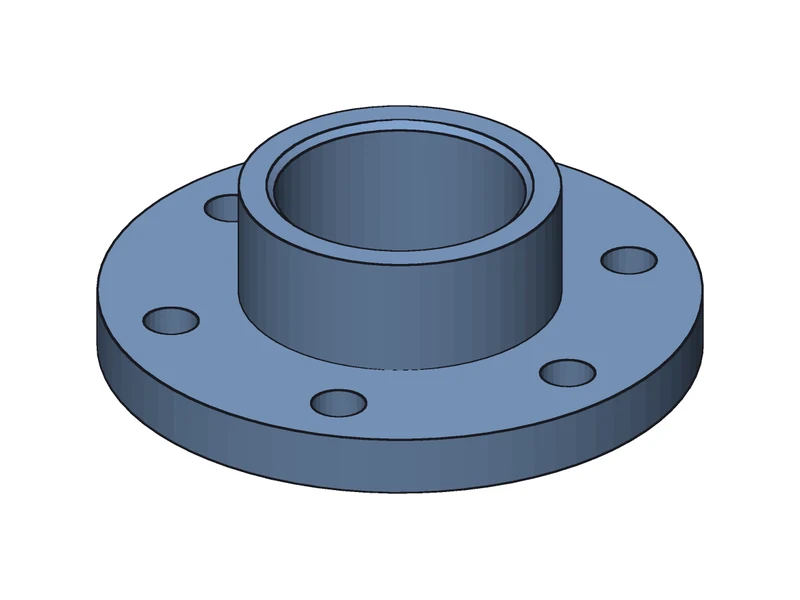
PolarLocations places the bolt circle; the bore's top edge is chamfered, picked by radius.
Open and export STEP →
Algebra mode, one constant per line, no #@ — open it and OD, HEIGHT and the rest are sliders.
"""M3 standoff with a hex nut pocket underneath. World Z-up, mm; it stands on Z=0."""
from build123d import *
from ocp_vscode import show

OD = 12.0  # outer diameter
HEIGHT = 15.0
BORE = 3.4  # M3 clearance hole
NUT_AF = 5.7  # nut across flats, plus clearance
NUT_DEPTH = 3.0

standoff = Cylinder(OD / 2, HEIGHT, align=(Align.CENTER, Align.CENTER, Align.MIN))
standoff -= Cylinder(BORE / 2, HEIGHT, align=(Align.CENTER, Align.CENTER, Align.MIN))
standoff -= extrude(RegularPolygon(NUT_AF / 2, 6, major_radius=False), amount=NUT_DEPTH)
top_outer = standoff.edges().group_by(Axis.Z)[-1].sort_by(SortBy.RADIUS)[-1]
standoff = chamfer(top_outer, 0.8)

show(standoff)
Here is exactly where the edges are. Code that can't run fails with an error that says why.
| build123d locally | This page | |
|---|---|---|
| Install | pip install build123d (pulls the OCP / OpenCASCADE wheels) | Open a web page |
| Viewer | ocp_vscode / the VS Code extension | Built in |
| Parameters | Change the number, run again | Sliders that rewrite the number |
| Sharing | Send the .py | One link with the code in it |
| Export | export_step() / export_stl() in your code | STEP and STL buttons |
| Libraries | Anything pip installs | numpy, bd_warehouse, sympy |
Put the code in the URL and the editor opens with it loaded and built — no file, no sign-up. It is made for AI assistants: when ChatGPT, Gemini or Claude writes build123d for you, ask it for a Forgent3D preview link. Whoever opens it sees the real geometry, can drag the parameters and export STEP. The “Open with sample code” button above is such a link.
Link format
https://app.forgent3d.com/build123d#code=<CODE>Prompt to try
Write build123d code for a ___ with one constant per line for the sizes, and give me a Forgent3D preview link: https://app.forgent3d.com/build123d#code=<the code, encodeURIComponent-encoded>One command, and the agent writes parametric build123d models in your repository and builds them on your machine with Forgent3D's CAD engine: it reads back the bounding box and volume, checks a three-view snapshot itself and exports STEP / STL. No Python or OCP install.
npx skills add forgent3d/forgent3d-skillsYes. Open the editor, paste code or open a link that carries it, and it builds the part in your browser; dragging parameters and exporting STEP or STL happen on the page. No install, no sign-up.
Usually not. from ocp_vscode import show and show(...) work as written: whatever you show is the part on screen. Without show, the object you pass to export_step and friends is used, and failing that the last 3D object. export_* calls write no file; use the export buttons on the page.
numpy, bd_warehouse, sympy and the Python standard library import as usual. CadQuery, scipy, matplotlib and shapely don't, and most direct from OCP import … doesn't either; the error tells you what to change.
No. Building and exporting happen in your browser, and code after # in a link is not sent to the server. Code reaches us only when you use AI edit, or Report a problem with “Attach the code” ticked.
Paste it into the editor, or ask the assistant for a link of the form https://app.forgent3d.com/build123d#code=<code> — it opens with the part already built.
Yes. It contains solids, so holes and round faces come in as cylinders you can select and dimension, not a triangle mesh.
Gears, bearing blocks, brackets, boxes… each a build123d model you resize in the browser and export as STEP.
Writing OpenSCAD instead? Real OpenSCAD renders in the browser and exports STEP too.
An AI agent writes parametric CAD code, builds and checks it, and hands you a model you can keep changing.
Article
If the model should not write B-rep, what should it write? The layer between the language model and the kernel, a CAD IR. What that layer has to carry, how Zoo's KCL answers it, and why a feature tree written as text is not enough.