

The short answer: whether a language model writes good CAD comes down to three things. How much of that code it has seen, how the code refers to faces and edges that already exist, and whether the AI can run its own code and measure what came out. On those three, build123d and CadQuery fit best today: they are Python, they sit on a B-rep kernel, and they run headless on your own machine. On Hugging Face's CADGenBench, as of 30 October 2026, every top-10 entry that names its modelling tool uses build123d.
OpenSCAD is the easiest to get running and has the lowest ceiling. KCL is the language most clearly designed with AI in mind, but models have barely seen it and its geometry is computed in Zoo's cloud. FeatureScript and the APIs of traditional CAD programs were never meant for writing a part from scratch.
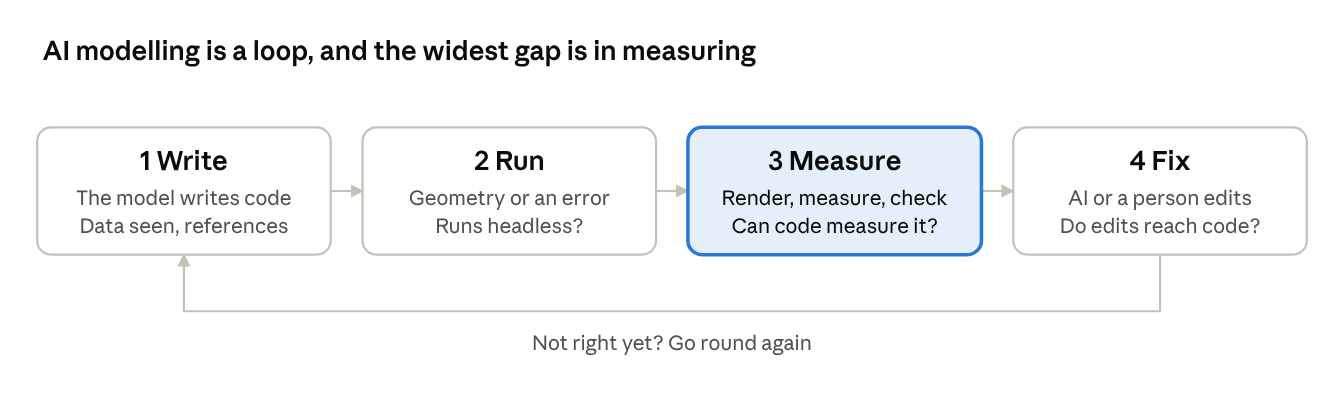
A person using CAD clicks and looks; the eye tells the hand which face to pick. A model only has text. When it writes "drill a hole in the top face", it cannot see the top face. So AI modelling is a loop: write code, run it in a kernel, render and measure the result, feed the picture and the errors back, and fix. Each section below looks at one step of that loop.
Disclosure: we build Forgent3D, an AI CAD platform based on build123d that also runs OpenSCAD. Why we have the AI write code rather than generate a mesh is in Code is the model. Where our own work comes up below, we say so.
The six options at a glance
Of the six, only build123d and CadQuery compute B-rep (exact geometry you can export as STEP) on your own machine, for free, without a GUI. OpenSCAD produces meshes. KCL, FeatureScript and the traditional CAD APIs all compute their geometry inside a vendor's program or cloud.
| Option | Language | Kernel and output | Where it runs | Licence | Version (Oct 2026) |
|---|---|---|---|---|---|
| build123d | Python library | OCCT, B-rep, exports STEP | Local pip install, runs headless | Apache-2.0 | 0.13.0 |
| CadQuery | Python library | OCCT, B-rep, exports STEP | Local pip or conda, runs headless | Apache-2.0 | 2.8.0 |
| OpenSCAD | Its own functional language | Mesh CSG (newer builds can use the Manifold backend), exports STL and 3MF, no STEP | Desktop app and CLI, also a wasm build | GPL | Stable release plus dev snapshots |
| KCL | Zoo's own language | Zoo's own geometry engine, B-rep, exports STEP | Zoo Design Studio or the API; geometry is computed in Zoo's cloud | Language and client MIT, engine closed | KCL 3.0, Design Studio 1.5.3 |
| FeatureScript | Onshape's own language | Parasolid, B-rep | Only inside Onshape | Standard library source is public, platform is commercial | Ships with Onshape |
| Traditional CAD APIs | VBA or C# for SolidWorks, Python or C++ for Fusion, C++ or Python for NX, and so on | Each vendor's kernel (Parasolid, ShapeManager and others), B-rep | An installed, licensed desktop program; SolidWorks is Windows-only | Commercial | — |
This table already settles half the question. An AI has to write, run and check many times over, and these columns decide what each run costs, whether you can run thousands of them on a server, and whether the output is exact geometry.
What public benchmarks say
The strongest data so far is Hugging Face's CADGenBench. As of 30 October 2026, every entry in its verified top 10 that names its modelling tool uses build123d; none uses CadQuery, OpenSCAD or KCL. First place is build123d-mcp with Claude Opus 5.5, at an overall score of 0.830.
The test is close to real work. 49 tasks give the AI an engineering drawing to model; 32 give it a STEP file and a change request ("reduce the number of impeller blades from 7 to 5"). The answer has to be a STEP file. It is first checked for being a valid, watertight solid, and an invalid one scores zero. Valid answers are scored on shape (40%), whether the mating features fit the same fixture (40%), and the number of pieces, through-holes and voids (20%). OpenSCAD only produces meshes, so it cannot even hand this exam in.
The language is not the whole score, though. The same model writing the same build123d can score very differently depending on its tools (chart below). The official baseline already feeds renders back to the model; build123d-mcp adds tools to measure volume and bounding boxes, find holes, compare against the input file and validate before export. Most of the gap comes from measuring, not from looking.
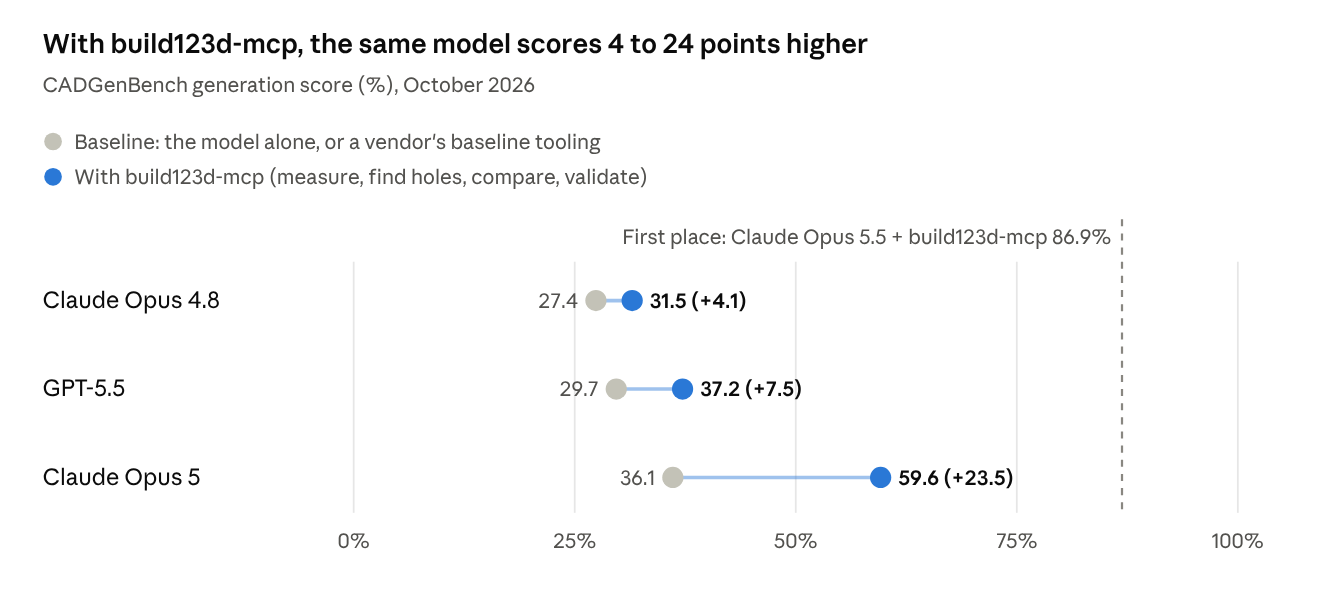
Read the chart with two caveats. The three baselines are not identical, and build123d-mcp itself kept improving over these months. Agent evaluations are also noisy: in our own, rerunning one configuration swings it by 16 points (write-up here). Treat +4 and +7 with care; Opus 5's +23.5 is the clear one. The scores are from the BenchLM snapshot of 28 October 2026, whose top 10 matches the live leaderboard.
Other public results:
| Source | Languages | What was tested | Result |
|---|---|---|---|
| ModelRift blog (Sep 2026, vendor) | OpenSCAD, CadQuery | Claude Opus 5 in Claude Code, three printable parts | Both sides finished. OpenSCAD raised 2 errors and had 5 silent wrong-geometry cases; CadQuery had 5 and 4. CadQuery can assert dimensions in code; the OpenSCAD side had to write its own STL parser |
| GrandpaCAD blog (vendor) | OpenSCAD, CadQuery, build123d | One model (gemini-3.5-flash), the same prompts | About 0.4 code errors per generation for OpenSCAD and 1.4 to 1.7 for build123d, mostly wrong method names and argument order |
| Text2CAD-Bench (May 2026, paper) | CadQuery vs command sequences | 600 text prompts, seven general-purpose LLMs | CadQuery code is clearly better; with command sequences, DeepSeek-V3.2's invalid rate rose from 13.3% to 67.3% |
| BenchCAD (May 2026, paper) | CadQuery | 17,900 industrial parts, image to code | Frontier models run but miss the shape: Claude Opus 4.7 executes 94.0% of the time with an IoU of 0.274, while a fine-tuned 2B model reaches 0.752. About 64% of "successful" edits silently break other features |
| CadQueryEval (community, archived Sep 2026) | CadQuery | 25 text tasks scored against reference STL | Four models already pass all 25; the benchmark is saturated |
The two kinds of result look contradictory: vendor blogs say OpenSCAD fails less, yet CADGenBench's leaders all use build123d. They measure different things. GrandpaCAD counts whether the code runs, on small 3D-printing parts; CADGenBench measures whether the geometry is right and whether it fits. For mechanical parts, the second is what counts.
One more caution: CADGenBench's tasks are public (the answers are not), and several rows on the board are the same author iterating on their tool. The top score is closer to a ceiling than to what you get out of the box.
How much the model has seen: training data and API churn
OpenSCAD and the Python options (CadQuery, build123d) have the most training data behind them; KCL and FeatureScript the least. But training data decides whether the first draft runs, not whether the final part is right.
- OpenSCAD: well over a decade of models on Thingiverse, Printables and GitHub, a syntax that has barely changed in years, and a few dozen keywords. Models rarely invent functions. The catch is that the corpus is mostly small printed parts; mechanical conventions are thin on the ground.
- CadQuery: rides on Python, so loops, functions and maths are the parts models know best. Academic work uses it for almost every dataset; CAD-Recode alone generated a million CadQuery programs.
- build123d: also Python, but younger, with less public code than CadQuery, and still at 0.x. The two share many method names, so models mix them up. That is exactly what GrandpaCAD saw: methods that don't exist, arguments in the wrong order, calls on the wrong kind of object.
- KCL: two or three years old and already reworked twice. Positional arguments became keyword arguments, then KCL 3.0 in 2026 replaced sketches with constraint-solved sketch blocks, switched on with
@settings(kclVersion = 3.0). What a general model remembers is mostly the old syntax; it has to read the docs. - FeatureScript: public code is mostly Onshape's standard library and community custom features, a small corpus. The FeatureScript MCP Server Onshape launched in September 2026 is built around a generate, run, debug and revise loop rather than expecting the model to get it right first time.
- Traditional APIs: there are plenty of SolidWorks VBA macros on forums, but most are recorded:
SelectByID2with coordinates,Sketch1,Boss-Extrude1. What a model learns from them is how to replay someone's clicks, not how to express a design. Fusion's Python API is tidier and well documented.
API churn costs more when an AI is writing the code. A person reads the changelog after an upgrade; a model waits for its next training run. Putting the current version's docs in front of the model, through the prompt or a tool, is work every one of these languages needs.
Referring to faces and edges: one part in six languages
One part: a 60 × 40 × 10 mm plate, R2 fillets on the four top edges, a Ø10 through-hole in the centre. The biggest difference between the six is how you say "those four top edges". That is where AI-written CAD goes wrong most often, because the model cannot see what it is selecting.
build123d
from build123d import *

plate = Box(60, 40, 10)
top_edges = plate.edges().group_by(Axis.Z)[-1]   # group by Z, take the highest group = the four top edges
plate = fillet(top_edges, radius=2)
plate -= Cylinder(radius=5, height=10)
The selection is an ordinary Python expression: take every edge, group them by height, keep the top group. The intermediate result is a variable, so the AI can print(len(top_edges)), confirm it got 4, and only then carry on. We ran this on build123d 0.13.0; the volume comes out at 23,046 mm³.
CadQuery
import cadquery as cq

plate = (
    cq.Workplane("XY").box(60, 40, 10)
    .faces(">Z").edges().fillet(2)
    .faces(">Z").workplane().hole(10)
)
String selectors like ">Z" are short, and models have seen plenty of them. The cost is that the whole chain shares a hidden stack: where .workplane() puts its origin and where .hole() lands depend on what the previous step left behind. In a long chain, models lose track of what is on the stack.
OpenSCAD
include <BOSL2/std.scad>
$fn = 64;

difference() {
    cuboid([60, 40, 10], rounding = 2, edges = TOP);  // round the four top edges
    cyl(d = 10, h = 12);                              // centre through-hole
}
OpenSCAD never selects an edge. Rounding comes either from a library parameter like BOSL2's edges = TOP, or from building the shape yourself with hull and minkowski. There is no wrong edge to pick, but anything the library does not cover, such as rounding an edge that only appears after a boolean, is close to impossible. With the Manifold backend this renders as 474 triangles with almost the same volume as the build123d version; the rounds are flat facets.
KCL
@settings(defaultLengthUnit = mm, kclVersion = 3.0)

profile = sketch(on = XY) {
  front = line(start = [var -30mm, var -20mm], end = [var 30mm, var -20mm])
  right = line(start = [var 30mm, var -20mm], end = [var 30mm, var 20mm])
  back = line(start = [var 30mm, var 20mm], end = [var -30mm, var 20mm])
  left = line(start = [var -30mm, var 20mm], end = [var -30mm, var -20mm])
}
plateRegion = region(segments = [profile.left, profile.front])
plate = extrude(plateRegion, length = 10mm, tagEnd = $top)

rounded = fillet(
  plate,
  edges = [
    { sideFaces = [plateRegion.tags.front, plate.faces.top] },
    { sideFaces = [plateRegion.tags.right, plate.faces.top] },
    { sideFaces = [plateRegion.tags.back, plate.faces.top] },
    { sideFaces = [plateRegion.tags.left, plate.faces.top] }
  ],
  radius = 2mm,
)
// centre hole with hole::hole(...) or subtract(...), omitted
KCL refers to geometry by tags: name the sketch lines, name the top face when you extrude, then describe an edge as "the one between these two faces". The names are chosen by whoever writes the code and do not depend on any geometric computation, which suits a model well. The cost is verbosity: four edges are written out four times, and you have to decide while sketching what you will want to refer to later. Adapted from the KCL 3.0 examples in Zoo's current docs; we have not run it.
FeatureScript
annotation { "Feature Type Name" : "Plate" }
export const plate = defineFeature(function(context is Context, id is Id, definition is map)
    precondition {}
    {
        fCuboid(context, id + "box", {
                "corner1" : vector(-30, -20, 0) * millimeter,
                "corner2" : vector(30, 20, 10) * millimeter
        });
        // top face = the face made by "box" that lies on the plane z = 10
        const top = qCoincidesWithPlane(qCreatedBy(id + "box", EntityType.FACE),
                plane(vector(0, 0, 10) * millimeter, vector(0, 0, 1)));
        opFillet(context, id + "fillet", { "entities" : top, "radius" : 2 * millimeter });
        fCylinder(context, id + "pin", {
                "bottomCenter" : vector(0, 0, 0) * millimeter,
                "topCenter" : vector(0, 0, 10) * millimeter,
                "radius" : 5 * millimeter
        });
        opBoolean(context, id + "cut", {
                "tools" : qCreatedBy(id + "pin", EntityType.BODY),
                "targets" : qCreatedBy(id + "box", EntityType.BODY),
                "operationType" : BooleanOperationType.SUBTRACTION
        });
    }, {});
FeatureScript refers to geometry with queries: "the face created by the box step that lies on the plane z = 10". A query describes where an entity came from plus a condition, so it still finds the same face after upstream parameters change; that is why Onshape's parametrics are so stable. But the language is built for writing features: you define a feature, then use it in a Part Studio, and the ids, units and context make even a simple part twice as long. Header and imports are omitted; the signatures were checked against FsDoc.
Traditional CAD APIs (SolidWorks VBA as the example)
' SolidWorks VBA macro (excerpt). API lengths are in metres
Set part = swApp.NewPart
part.Extension.SelectByID2 "Front Plane", "PLANE", 0, 0, 0, False, 0, Nothing, 0
part.SketchManager.InsertSketch True
part.SketchManager.CreateCenterRectangle 0, 0, 0, 0.03, 0.02, 0
part.SketchManager.CreateCircleByRadius 0, 0, 0, 0.005
part.FeatureManager.FeatureExtrusion2 True, False, False, 0, 0, 0.01, 0, False, False, False, False, 0, 0, False, False, False, False, True, True, True, 0, 0, False
' select the four top edges by naming a point in space that lies on each one
part.Extension.SelectByID2 "", "EDGE", 0, 0.02, 0.01, False, 1, Nothing, 0
part.Extension.SelectByID2 "", "EDGE", 0, -0.02, 0.01, True, 1, Nothing, 0
part.Extension.SelectByID2 "", "EDGE", 0.03, 0, 0.01, True, 1, Nothing, 0
part.Extension.SelectByID2 "", "EDGE", -0.03, 0, 0.01, True, 1, Nothing, 0
' then FeatureFillet3, with another dozen or so positional arguments
A traditional API automates the GUI: select first, then run the command, and you select by a name shown in the GUI (Front Plane) or by a point in space. The model has to work out the coordinates of a point on each edge itself. Change a dimension and forget the coordinates, and it selects something else or nothing at all, and the only error is a False. Fusion's API is better here: an extrude feature hands you its endFaces and sideFaces, so you can reach faces through the feature, much like FeatureScript.
In short
For an AI, a good reference meets three conditions: it lives in the code rather than in GUI state, it can be checked while the code runs, and it still holds when a dimension changes. build123d, CadQuery, KCL and FeatureScript mostly manage all three; they differ in how much typing it takes and how hard a mistake is to track down. OpenSCAD sidesteps the problem, and picking by coordinates fails all three.
Can the AI run and measure its own work?
This step opens up the widest gap. On CADGenBench, Claude Opus 5 scored 36.1% on the generation tasks with Mecado's baseline tooling and 59.6% with build123d-mcp, which can measure dimensions. ModelRift's experiment reached the same conclusion from another direction: numeric checks such as wall thickness and clearance were more reliable than renders, and the renders caught nothing that mattered.
| Option | Runs locally, headless? | What a failure looks like | Can the code measure the result? |
|---|---|---|---|
| build123d | Yes, one Python package | A Python traceback points at the line; a kernel failure gives one terse OCCT message | Yes: volume, bounding box, faces, edges and distances are object properties |
| CadQuery | Yes | Same, but harder to tell which step of a long chain failed | Yes |
| OpenSCAD | Yes, one CLI program | Syntax errors come with line numbers; geometry almost never errors, a wrong part still renders | No, it can only echo its own variables |
| KCL | The language parses locally; geometry needs Zoo's engine | Errors returned by the engine | Through Zoo's API |
| FeatureScript | No, only inside Onshape | Feature errors, shown in Onshape | Yes (evVolume, evBox3d and friends), but only inside Onshape |
| Traditional APIs | Needs a running, licensed desktop program | Usually a False or an empty object | Yes, with the program running |
For an AI product, the headless column sets the cost. One conversation rebuilds the part dozens of times, which adds up to thousands of builds a day. build123d, CadQuery and OpenSCAD can go in a container and run in parallel; KCL and FeatureScript call the vendor's service every time; SolidWorks will not go in a Linux container at all.
The measuring column sets the quality. OpenSCAD's booleans run on meshes and almost always produce something, so its errors are quiet: a hole 2 mm off still builds, and the model has no way to ask in code where the hole's centre is. In B-rep, a fillet that is too big fails outright. The message is not friendly (ModelRift got a bare BRep_API: command not done), but at least the problem surfaces.
B-rep has quiet errors too. In ModelRift's threaded part, CadQuery's union() silently dropped the core cylinder: the volume came out at 68% of what it should have been, and the solid still reported itself as valid. What caught it was a single volume assertion.
Which measuring tools we gave our own agent, and what each one answers, is in A CAD agent that measures its own work.
Geometry ceiling: mesh or B-rep
The kernel sets the limit on what parts an AI can write. OpenSCAD hands back a mesh, which is fine for 3D printing and a dead end for machining and assembly; the other five are all B-rep and export STEP.
| Option | Geometry | Fillet or chamfer any edge | STEP export | Notes |
|---|---|---|---|---|
| build123d | B-rep (OCCT) | Yes | Yes | Shell, loft, sweep and thread libraries all there; OCCT's fillets and booleans are less robust than Parasolid's |
| CadQuery | B-rep (OCCT) | Yes | Yes | Same, plus assemblies with a constraint solver |
| OpenSCAD | Triangle mesh | No; library parameters or hull / minkowski workarounds | No | Curves are facets, resolution set by $fn |
| KCL | B-rep (Zoo's own engine) | Yes | Yes | The engine is still changing quickly |
| FeatureScript | B-rep (Parasolid) | Yes | Yes, exported through Onshape | The most mature kernel here; assemblies live in Onshape, outside FeatureScript |
| Traditional APIs | B-rep (Parasolid, ShapeManager and others) | Yes | Yes | Sheet metal, weldments, surfacing and drawings all included |
The mesh problem goes beyond "no STEP". A machinist picks a cylindrical face in CAM to locate a hole and a planar face to set a datum; a mesh only has triangles. A round hole in a mesh is a ring of small flat faces, and you cannot put a fit tolerance on it. Disclosure: we built an OpenSCAD to STEP converter that turns BOSL2 roundings back into true cylinders and tori, but threads and helical gears still come out faceted.
This is also where traditional CAD is strongest. Sheet-metal flat patterns, weldment cut lists and toleranced 2D drawings are the things manufacturing actually needs, and code CAD is weak at all of them. An AI that could drive SolidWorks or NX reliably would get the whole toolchain; what stops it is the referencing and the loop from the last two sections.
After generation: who edits the part
An AI rarely gets a part right first time. In practice a person changes a number, the AI carries on, and it goes back and forth a few times. So whether code and GUI stay in sync in both directions matters as much as raw generation ability.
- Traditional CAD: what the AI builds through the API is a native feature tree, and an engineer can open it and edit it as if they had built it. That is the biggest advantage of the traditional APIs. The other direction is hard: once a person has edited the tree, the AI has to make sense of the features and their names again before it can continue.
- FeatureScript: a generated custom feature shows up in Onshape's feature list, and the parameters declared in its
preconditionbecome a dialog automatically, so changing them needs no code. Anything beyond those parameters means going back to the code. - KCL: Zoo Design Studio works both ways. Point-and-click edits are written back into the KCL, and editing the code updates the view. This is where KCL's design pays off most for people and AI working together.
- OpenSCAD: the Customizer turns top-level variables into sliders and drop-downs. A person can change what the AI chose to expose; everything else is code.
- build123d and CadQuery: no editing GUI of their own. ocp_vscode and CQ-editor show the model but cannot write a click back into the code. That is no problem for engineers who know Python and a real barrier for people who only use a mouse.
Where the code is the single source of truth and GUI edits are written back into it, people and the AI can hand the part back and forth easily. With traditional CAD, handing the part from the AI to a person is easy and handing it back is hard. Disclosure: filling that gap for build123d is what Forgent3D does. It derives a step-by-step outline and a parameter panel from the source, and numbers changed in the panel are written back into the code.
Verdicts, tool by tool
Putting the five dimensions together, build123d is the most balanced choice for mechanical parts, and OpenSCAD is the least effort for small printed parts.
| Option | Training data | Referring to geometry | Run and measure | Geometry ceiling | Human hand-off | Best for |
|---|---|---|---|---|---|---|
| build123d | Medium | Strong | Strong | Strong | Weak | Mechanical parts that need STEP; the back end of an AI product |
| CadQuery | Strong | Medium; the hidden stack trips models up | Strong | Strong | Weak | Research; teams with existing CadQuery code |
| OpenSCAD | Strong | Doesn't select; library parameters instead | Medium; runs but can't measure | Weak; mesh | Medium; Customizer | 3D-printed and small parametric parts |
| KCL | Weak | Strong | Medium; geometry in the cloud | Medium | Strong; two-way editing | People already using Zoo |
| FeatureScript | Weak | Strong | Medium; Onshape only | Strong | Medium; parameter dialogs | Onshape users writing reusable features |
| Traditional APIs | Medium; mostly recorded macros | Weak | Weak | Strong | Strong to a person, weak back to the AI | Automating existing SolidWorks or Fusion workflows |
build123d: the best choice for AI-generated mechanical parts today
Almost every leading CADGenBench entry uses it. Objects are explicit, selections are Python expressions, and results can be measured and asserted in code, which is exactly what the AI's loop needs. Its weak spot is models getting method names wrong, so give the model the current API reference and a way to measure.
CadQuery: the B-rep code models know best
Nearly every academic dataset and benchmark uses it, so first drafts run reliably. The main trap is the hidden stack in its fluent chains. Its absence from the CADGenBench top 10 may simply mean nobody submitted with it, which is not enough to call it weaker.
OpenSCAD: easiest to get running, lowest ceiling
A small syntax, a large corpus and fast renders mean even small models get it right, which is why consumer AI-for-3D-printing tools tend to pick it. The price is mesh output, no filleting of arbitrary edges and no way to measure the result; once a part has to be machined or assembled, it runs out of road.
KCL: designed for AI, held back by training data and the cloud
Tag-based references and two-way editing are the right ideas. But general models have barely seen it, the syntax is still changing, and its geometry has to be computed in Zoo's cloud, so it is hard to use outside Zoo's own product. We go into KCL's design choices in A CAD IR for language models should not be a feature tree.
FeatureScript: for writing features, not parts
Its query system is the most robust and its kernel, Parasolid, the strongest, but it is a language for extending Onshape with new features. Having an AI write a reusable "thread to standard" feature suits it well; having it model a bracket from scratch is the long way round.
Traditional CAD APIs: easy to hand to an engineer, hard to hand back to the AI
Single-session synchronous calls, no Linux containers and selection by coordinates make them a poor back end for an AI product. They fit automation inside existing workflows: batch export, property edits, families of parts from a template. A number of SolidWorks and Fusion MCP servers already do this.
If you are building AI CAD, fix the loop first
The language sets the starting point; the loop sets how far you get. In practice that means four things:
- Pick something that runs headless on your own machines and produces B-rep. Today that means build123d or CadQuery.
- Give the model ways to measure: volume, bounding box, hole positions and the difference from a reference part all tell it more than a render does.
- Put the current version's API docs in its context. Don't count on it remembering them.
- Let a person take over, and make sure their edits land back in the code, so the AI can pick up where they left off.
Once general models have seen enough KCL and FeatureScript, this ranking may change. The point about the loop will not.
FAQ
What is the best CAD language for AI to write?
For mechanical parts that need STEP, build123d: as of October 2026, almost every leading CADGenBench entry uses it. For small 3D-printed parts, OpenSCAD is the easiest to get right in one go.
build123d vs CadQuery: which is better for AI?
Both use the same kernel, OCCT. CadQuery has more training data, so first drafts run more often; build123d's objects and selections are more explicit, which makes it easier for the AI to check its work along the way, and the best public benchmark results come from build123d.
Can OpenSCAD export STEP?
Not by itself; it only produces triangle meshes such as STL and 3MF. Getting STEP takes a converter, and curved surfaces like threads still come out faceted. The options are compared in How to export STEP from OpenSCAD.
Can ChatGPT or Claude write SolidWorks macros?
Yes, and the macros often run. But they select faces and edges by coordinates and GUI names, so a changed dimension easily breaks the selection, and you need a running, licensed copy of SolidWorks to execute and check them.
What is KCL?
KCL is the modelling language Zoo designed for its own CAD. Its geometry is computed by Zoo's engine in the cloud, and Zoo Design Studio lets you edit a model both as code and through the GUI.
Can AI write Onshape FeatureScript?
Yes; Onshape launched a FeatureScript MCP Server in September 2026. It suits generating reusable custom features better than modelling one-off parts.
Sources
- CADGenBench leaderboard (viewed 30 October 2026) and repository
- BenchLM snapshot of CADGenBench generation scores (28 October 2026)
- build123d-mcp
- Text2CAD-Bench, BenchCAD, CAD-Recode
- ModelRift: CadQuery vs OpenSCAD, GrandpaCAD: OpenSCAD vs CadQuery vs Build123d
- CadQueryEval
- Onshape: FeatureScript MCP Server, FeatureScript standard library docs
- KCL fillet docs (KCL 3.0), Zoo Design Studio releases
- Versions: build123d, CadQuery (PyPI, checked 30 October 2026)